在MySQL登录时出现Access denied for user 'root'@'localhost' (using password: YES) 拒绝访问
某一天发现mysql登录失败了,登录的时候报下面的错误
在MySQL登录时出现Access denied for user ‘root‘@‘localhost‘ (using password: YES) 拒绝访问.
一般出现这样的错误都是因为密码错了。如果原来的密码不记得了,这时候只能重新设置下密码。
解决方法:
1、到mysql的安装目录下找到my.ini, 在[mysqld]后添加skip-grant-tables(使用 set password for设置密码无效,且此后登录无需键入密码)。
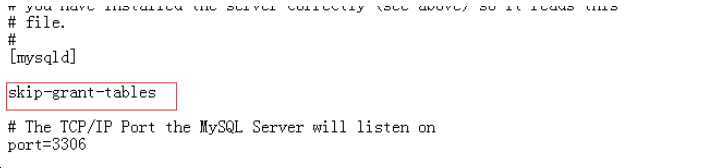
2、 然后重启mysql服务, net stop mysql;net start mysql;
3、登录mysql,键入mysql –uroot –p;直接回车(Enter)
4、修改密码: alter user root@‘localhost‘ identified by ‘test1234‘;
5、退出mysql;把上面添加到my.ini的skip-grant-tables删除,
6、最后重启mysql服务 net stop mysql;net start mysql;
文章来自:https://www.cnblogs.com/ahcc08/p/12532134.html